Shopify covers more of the technical groundwork than most store owners realize. Canonical tags, XML sitemaps, HTTPS, CDN delivery, and mobile-responsive themes all ship with the platform by default.
What Shopify cannot provide is your strategy; the keyword decisions, the content depth, the internal link architecture, the schema completeness, and the authority signals that determine whether your store ranks on page one or page four for the queries your buyers actually use.
These SEO tips for Shopify are not a recycled best-practices list. They are the specific decisions that practitioners make when building Shopify stores designed to compound their organic presence over 12 to 24 months.
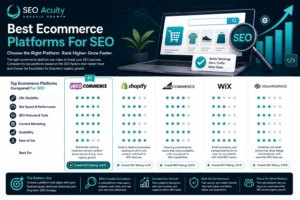
The best ecommerce platforms for SEO comparison will tell you where Shopify leads and where its structural constraints require planning. If you’re already on Shopify, the playbook below is what moves the needle.
The ten items below are the levers that surface repeatedly when audits diagnose why a Shopify store isn’t ranking for the queries it should own. These are action-oriented Shopify SEO tips — not a philosophical overview.
1. Fix The Technical Foundations As The Most Important Shopify SEO Tips
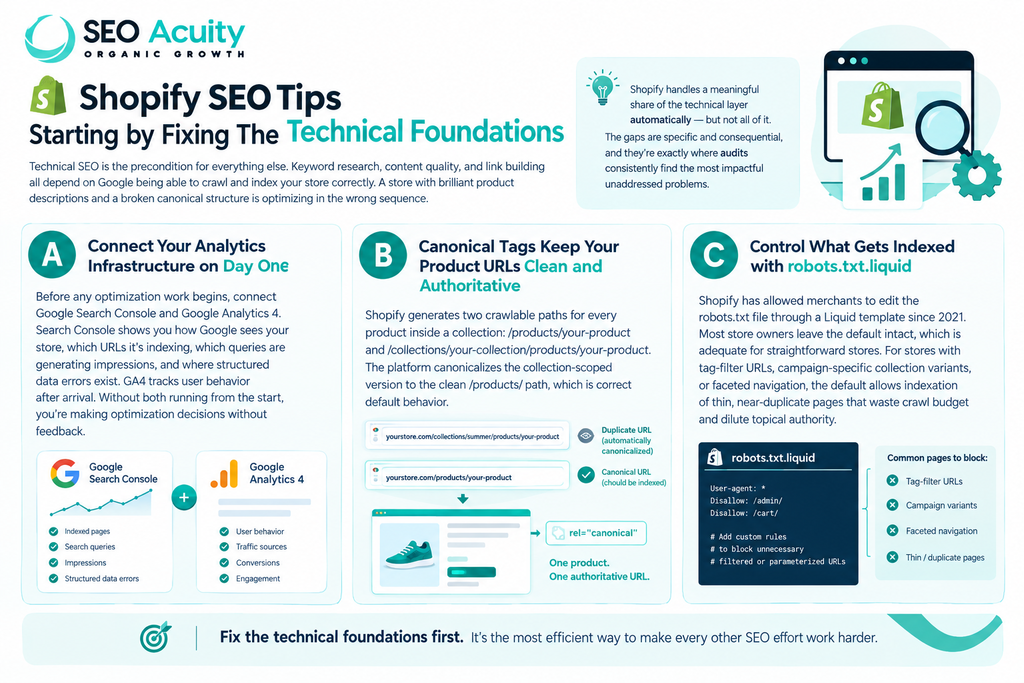
Technical SEO is the precondition for everything else. Keyword research, content quality, and link building all depend on Google being able to crawl and index your store correctly.
A store with brilliant product descriptions and a broken canonical structure is optimizing in the wrong sequence.
Shopify handles a meaningful share of the technical layer automatically — but not all of it. The gaps are specific and consequential, and they’re exactly where audits consistently find the most impactful unaddressed problems.
A. Connect Your Analytics Infrastructure On Day One
Before any optimization work begins, connect Google Search Console and Google Analytics 4. Search Console shows you how Google sees your store, which URLs it’s indexing, which queries are generating impressions, and where structured data errors exist.
Submit your sitemap at yourdomain.com/sitemap.xml through Search Console. Shopify regenerates the sitemap automatically as products and collections change, but it doesn’t submit itself.
After submission, check the Pages Index report rather than the Sitemaps confirmation, a URL appearing in your sitemap and a URL being indexed by Google are two different states, and the gap between them is exactly where technical SEO problems live.
B. Check The Canonical Tags That Keep Your Product URLS Clean And Authoritative
Shopify generates two crawlable paths for every product inside a collection: /products/your-product
and /collections/your-collection/products/your-product.
The platform canonicalizes the collection-scoped version to the clean /products/ path, which is correct default behavior.
What breaks it is app installations and theme edits that inadvertently override or redirect around the canonical signal. Check your canonical implementation directly: load any product page, view source, and find the rel=”canonical” tag in the head. Confirm it points to the clean /products/ URL, not the collection path.
On a store with 300 products, a broken canonical is equivalent to having 600 URLs diluting your ranking signals across duplicate versions of the same content — a quiet, compounding drag on organic performance.
C. Control Unnecessary Crawling With Robots.Txt.Liquid
Shopify’s default robots.txt works well for most stores, but faceted navigation, tag filters, and app-generated URLs can create unnecessary crawl paths. For larger stores, customizing robots.txt.liquid can help search engines focus on important product and collection pages.
Remember that robots.txt controls crawling, not indexing. Use canonical tags to consolidate duplicate URLs and noindex when a page should stay out of search results. Also review internal links to ensure low-value filtered URLs are not receiving unnecessary crawl attention.
Treat robots.txt, canonicals, noindex, faceted navigation, and internal linking as one system rather than separate fixes.
▶ Watch: How to Let Your Store Appear in Google and AI Search Results
2. Start With Shopify’s Technical SEO Foundations
Most Shopify stores approach keyword research once, at launch, and then let it sit. Markets shift, product categories evolve, and buyer language changes.
A keyword strategy from 18 months ago is not the same opportunity set as today’s — and treating it as a completed task rather than a running system is one of the most common reasons stores plateau after early gains.
The practical framework for Shopify keyword research breaks into three layers.
- Product-level queries are transactional and highly specific “men’s waterproof trail running shoes size 11” and belong on product pages.
- Collection-level queries are commercial and category-focused “waterproof trail running shoes” and belong on collection pages.
- Informational queries — “how to choose trail running shoes for winter” — belong in blog content.
Each layer maps to a different type of page and a different moment in the buyer journey. Build seed terms from your product categories, then expand them using Google Keyword Planner, Ahrefs, or Semrush.
Revisit your keyword research every quarter. New long-tail opportunities emerge as products evolve, as buyer language shifts, and as existing pages accumulate performance data that tells you which queries they’re close to ranking for with marginal additional effort.
Watch: Organic Growth Strategy a practical walkthrough of how organic search becomes your most durable acquisition channel.
Ready to Improve Your Search Engine Rankings?
Accelerate your organic growth and scale your business leads with our data-driven SEO strategies.
Get a Free Quote NOW!3. Optimize The Site Architecture And Internal Linking
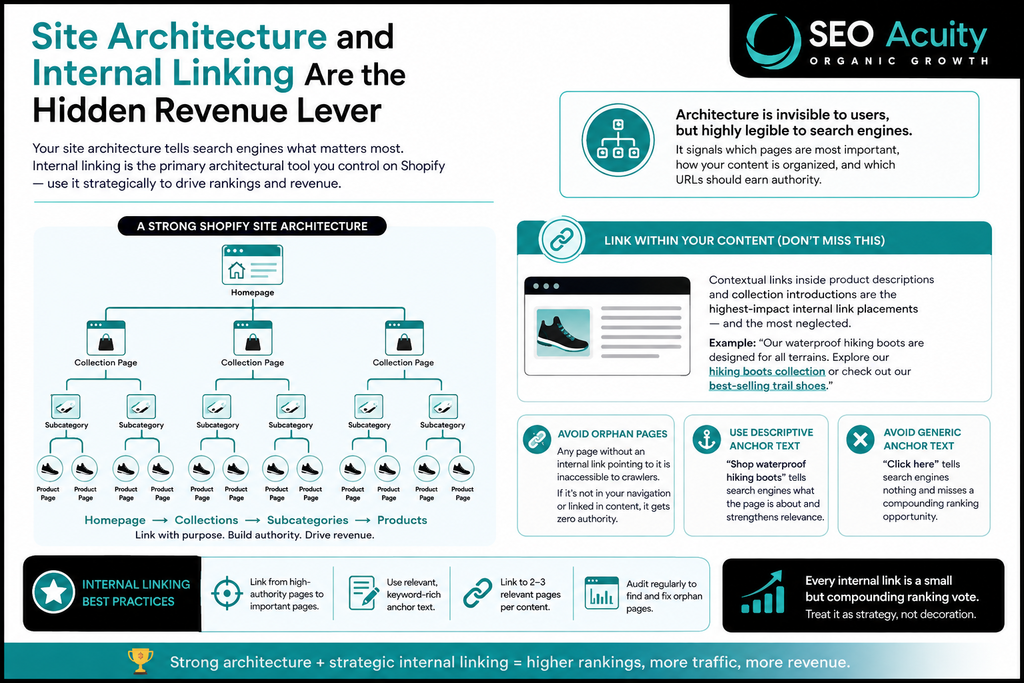
Site architecture is invisible to most store owners and highly legible to search engines. How your pages link to each other tells Google which pages you consider most important, how your content is organized by topic, and which URLs should accumulate authority.
The foundational structure is straightforward: the homepage links to the most important collections, collections link to subcategories and top products, and product pages link back to their parent collections and to two or three related items.
Avoid orphan pages. Any page without an internal link pointing to it is inaccessible to crawlers navigating through your store’s architecture. A collection can exist in Shopify and appear in the XML sitemap without receiving meaningful contextual internal links from the rest of the store.
Use descriptive anchor text on every internal link. “Shop waterproof hiking boots” tells search engines what the destination page is about and contributes a relevance signal for that page. “Click here” tells them nothing.
The anchor text of each internal link is a small but compounding ranking vote for the destination treating it as decoration rather than strategy is a persistent missed opportunity.
4. Improve The Product And Collection Pages
Product pages capture long-tail transactional queries. Collection pages capture higher-volume category queries.
Both are the commercial core of a Shopify store’s organic footprint — and both are consistently the most under-optimized pages in stores that concentrate SEO effort on blog content and link building while leaving their money pages thin.
The right frame before approaching these pages: they are landing pages competing for specific queries against well-resourced competitors.
Every element, title tag, meta description, H1, body copy, image alt text, schema, contributes to whether the page ranks for the target query and whether the visitor who arrives converts.
A. Write Product Descriptions That Answer Real Buyer Questions
Manufacturer descriptions are the most common source of duplicate content on Shopify stores. Every retailer using the same wholesale supplier copies the same text, and search engines identify it immediately.
Write original product descriptions for every SKU that matters commercially — your bestsellers, your highest-margin products, and anything you want to own a specific query for.
A useful product description answers the four or five questions a buyer would ask before deciding: What exactly is this? Who is it designed for? What makes it different from the alternatives? Are there limitations I should know about? A concise description that fully answers those questions outperforms four hundred words of brand-voice filler that answers none of them.
For stores managing hundreds of SKUs, the systematic approach matters as much as individual execution. On-Page SEO Services provide the framework for optimizing at scale without sacrificing the content quality that makes product pages rank and convert.
Discover Why to Choose SEO Acuity for Off-Page SEO
B. Focus On The Collection Pages
Collection pages typically rank for the highest-volume keywords in a Shopify store’s organic footprint — the category searches that drive the most traffic. Yet the majority of stores leave collection pages as nothing more than a title and a product grid.
Add 100 to 200 words of original introductory text above the product grid on your most commercially important collections. The copy should define what the collection contains, help buyers understand how to choose between options, and link to relevant subcategories and top-performing products within the text.
The primary keyword should appear in the first sentence naturally, with related terms distributed through the body.
This combination — original content, internal links, and keyword relevance — is what transforms a collection from a product grid into a ranking asset.
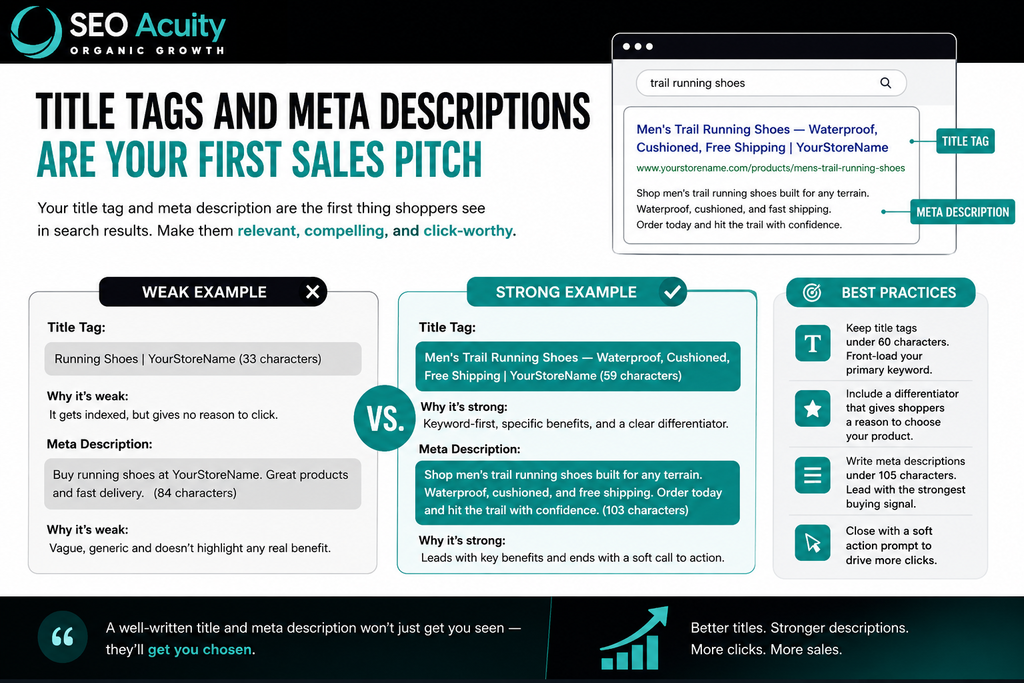
C. Optimize Title Tags And Meta Descriptions To Turn Searchers into Buyers
A title tag has two jobs: signal relevance to search engines and convince a searcher to click your result over the ten alternatives beside it. Most Shopify title tags accomplish the first adequately and ignore the second entirely.
“Running Shoes | YourStoreName” is present in the index. “Men’s Trail Running Shoes — Waterproof, Cushioned, Free Shipping | YourStoreName” does the same indexing job while giving a buyer three reasons to click.
Aim for roughly 50–60 characters where possible, while prioritizing clarity and avoiding unnecessary truncation, front-load the primary keyword, and include a differentiator wherever character count allows.
Meta descriptions don’t influence rankings directly, but they determine the click-through rate your ranking position actually delivers.
Aim for concise, persuasive descriptions of roughly 120–155 characters when appropriate, but prioritize communicating the page’s value proposition over hitting an exact character count, lead with the strongest buying signal for that specific page, and close with a soft action prompt.
5. Implement Schema Markup To Support Rich Results And Machine Understanding
The structured data may help systems interpret entities/products, rather than suggesting a direct AI ranking mechanism.
For Shopify stores, it determines whether product listings appear in search results with price badges, availability indicators, and star ratings, or appear as plain blue links competing on title and description alone.
The difference in click-through rate between a rich result and a plain listing at the same position is measurable and commercially significant. Most Online Store 2.0 Shopify themes include basic product schema.
“Basic” is the key qualifier. Run any product page through Google’s Rich Results Test and verify whether the output includes all required fields: name, price, priceCurrency, availability, and aggregateRating.
The last two are the most frequently omitted — and they’re responsible for the in-stock indicators and star ratings that visually differentiate listings in the search results page.
A. Monitor Product Schema That Tells Both Google And Ai Systems What You Sell
Product schema is the most commercially valuable structured data on a Shopify store. When implemented completely it makes product pages eligible for rich results in traditional search and more extractable by AI engines parsing your pages for product information.
Product structured data can make pages eligible for richer search appearances, which may improve visibility and click-through rate when those enhancements are shown.
After any schema implementation, validate using Google’s Rich Results Test and the Schema.org validator, then monitor the Structured Data report in Google Search Console for errors that appear over time.
Ready to Improve Your Search Engine Rankings?
Accelerate your organic growth and scale your business leads with our data-driven SEO strategies.
Get a Free Quote NOW!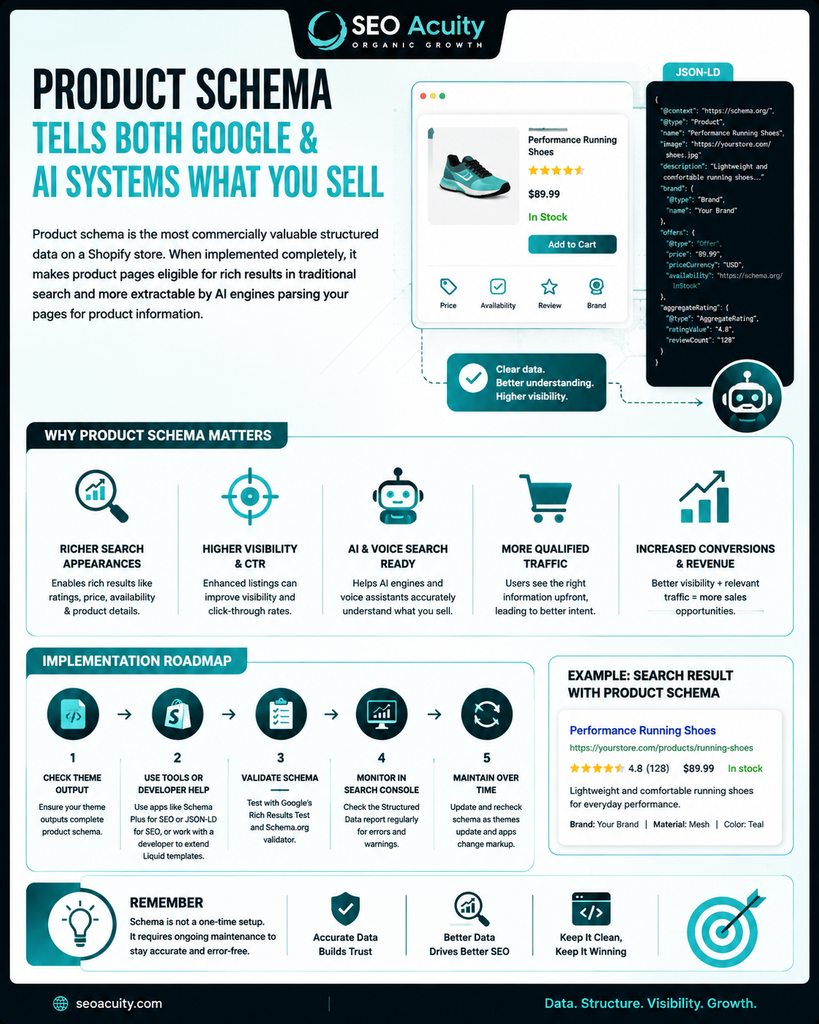
B. Review Schema Turns Customer Opinions Into Visible Serp Differentiators
Customer reviews create one of the strongest visual differentiations in search results when properly marked up as structured data. A product listing showing ★★★★☆ (4.7) at position four competes differently in the click decision than an unmarked listing at position two; the review display can override positional advantage.
Implement a review schema that includes ratingValue, reviewCount, and where available, individual reviewBody entries. The common failure point is review data rendered by a third-party app like Judge.me or Yotpo through client-side JavaScript.
Some Googlebot configurations and AI crawlers may not execute JavaScript during the crawl, meaning reviews appear visually on the page but are absent from the schema output.
Confirm that the aggregateRating is present in the server-rendered HTML, not dependent on JavaScript execution to appear. Passing Google’s Rich Results Test confirms eligibility, not guaranteed display in search results.
C. Optimize Breadcrumb List Schema To Clarify Your Store Hierarchy For Search Engines
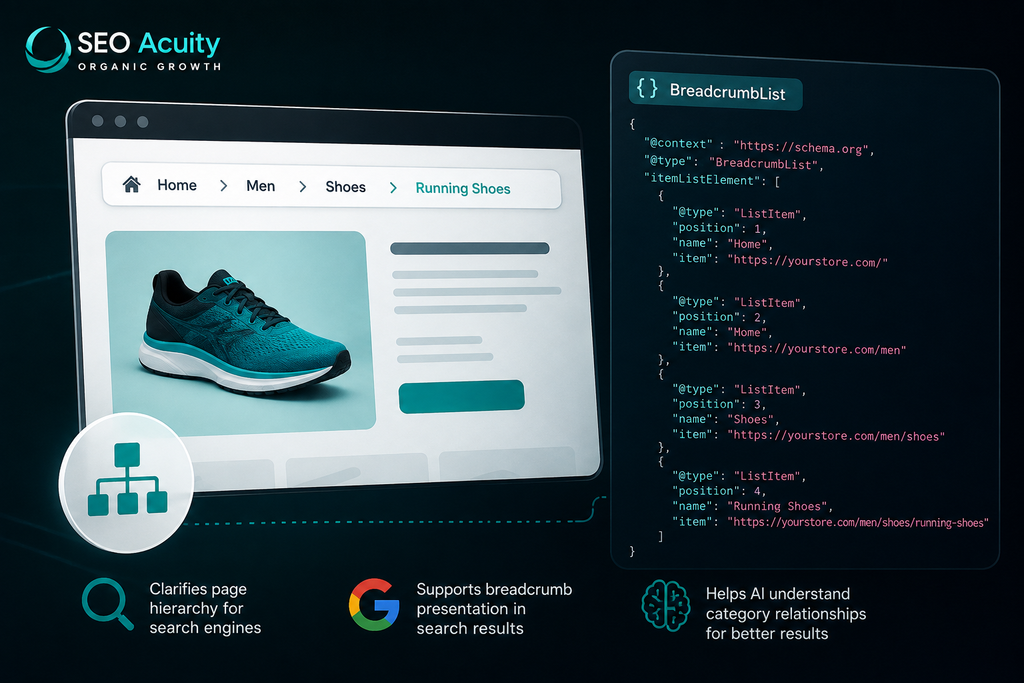
Breadcrumb List schema tells search engines how your pages relate to each other in the store’s organizational structure.
When implemented correctly, BreadcrumbList markup helps Google understand a page’s position within your site hierarchy and can support breadcrumb-style search presentation where Google chooses to display it.
Most Shopify themes on Online Store 2.0 add BreadcrumbList schema automatically. Verify it’s working by running both a product and a collection page through the Rich Results Test and confirming BreadcrumbList output appears in the structured data results.
Breadcrumb schema also helps AI systems understand the categorical relationships between your pages — a signal that supports accurate retrieval when a buyer asks a category-level question rather than a product-specific one.
6. Fix Image and Page Speed Issues to Avoid the Performance Tax You Cannot Afford to Ignore
Shopify stores run on a global CDN with automatic delivery optimization, a meaningful head start that most platforms don’t provide.
What erodes that advantage is uncompressed product photography, app-injected JavaScript, and theme sections loading resources on pages that don’t use them. The platform gets your store to the starting line fast; store owners then systematically slow it down.
The two most impactful performance problems on most Shopify stores are image weight and app bloat.
Large hero images on collection pages and uncompressed product photos are the most common cause of Largest Contentful Paint failures in Google’s Core Web Vitals assessment.
The threshold for “good” LCP is 2.5 seconds at the 75th percentile of real user visits, most stores with unoptimized product photography fail this on mobile.
Use WebP format wherever possible, compress images before upload, and never lazy-load the primary product image above the fold. Below-the-fold images benefit from lazy loading; above-the-fold ones need to load immediately.
Audit your installed apps quarterly: for each one, determine whether it’s actively contributing revenue or a specific function. Uninstall tools you’re no longer using, don’t just disable them.
Removing an app does not always remove theme snippets, app embeds, scripts, or other residual code introduced during installation, so audit the storefront after uninstalling.
Watch: When To Do SEO And Don’t? Understand which stages of store growth are right for serious SEO investment and when other channels deserve priority first.
7. Pay Attention To The Backlinks That Strengthen The Authority
Organic rankings depend heavily on both relevance and authority. While on-page SEO helps search engines understand how relevant your pages are, backlinks from reputable and relevant websites strengthen your site’s authority.
A more effective approach is to create valuable content and collection pages that naturally attract external links, then use internal links to pass authority to important product pages.
For small business SEO, focused outreach is often more effective than large-scale link-building campaigns. Concentrate on the ten to twenty publications, websites, and communities your target customers actually trust.
The benefits of AI SEO for businesses can support this strategy as well, since strong brand mentions and authoritative citations can contribute to visibility across both traditional search and AI-powered platforms.
8. Focus On Ai Search That Has Changed The Rules
Traditional SEO focuses on ranking pages in search results, while AI search focuses on retrieving clear, trustworthy information to answer specific buyer questions.
Platforms such as ChatGPT, Gemini, and Perplexity increasingly influence product discovery, making it important for Shopify stores to optimize for both traditional rankings and AI retrieval.
For Shopify merchants, this means creating content that can stand on its own when extracted from a page.
Product descriptions should begin with a clear statement of what the product is and does, FAQ answers should provide direct responses, and collection introductions should quickly explain what the collection contains and who it serves.
Understanding what is AI SEO and the principles of large language model optimization (LLMO) can help merchants structure content for better AI visibility.
9. Turn Your Shopify Blog Into a Purchase Funnel Converts Informational Queries
Most Shopify merchants either skip the blog entirely or fill it with company news that no buyer is searching for. Both are missed revenue.
The blog is where you capture buyers at the top and middle of the funnel, people who are researching, comparing, and educating themselves before they spend.
Target those queries, answer them completely, and link deliberately to your product and collection pages; the blog becomes a compounding traffic asset that routes buyers directly into your purchase flow without touching your paid budget.
Informational content also plays an outsize role in AI search visibility. AI retrieval systems surface content that explains concepts, answers questions, and provides contextual guidance — exactly what a well-executed blog post does.
Here is how to make your Shopify blog a functioning purchase funnel:
- Target buyer-intent informational queries — “best X for Y,” “how to choose X,” “X vs Y” — not generic industry topics that attract readers who will never purchase.
- Write each post to answer one specific question completely, so AI systems can extract a standalone, self-contained answer from any section.
- Link every post to at least one relevant product or collection page using descriptive anchor text that signals what the destination page is about.
- Cluster related posts around the same product category — twelve posts about a single category reinforce your collection page’s topical authority more than twelve posts across twelve topics.
- Update high-traffic posts regularly with new data, pricing changes, or product additions; freshness signals matter in both traditional and AI search ranking.
- Use conversational and long-tail queries in your post headings — “what should I look for when buying X” captures voice and AI search traffic that a single keyword-optimized title cannot.
- Track which posts drive assisted conversions in GA4, not just sessions — the revenue contribution of blog content almost never shows up in last-click attribution, which is why most merchants undervalue it.
Watch: How to Multiply the Performance of AI Search and SEO
10. Run Regular SEO Audits To Turn Your Shopify SEO Checklist Into a Working Strategy
A Shopify SEO checklist is a starting point, not a permanent state of optimization. Platform updates, theme changes, new products, redirects, and broken structured data can gradually weaken your SEO without triggering obvious alerts.
What is an SEO audit for a Shopify store? It is a structured review of the signals that affect how search engines and AI systems crawl, understand, index, and rank your store. This includes technical health, content quality, internal linking, backlinks, and AI-readiness rather than simply measuring traffic or assigning a score.
Understanding the types of SEO audits helps determine what needs to be reviewed and when. Technical audits examine crawlability, indexing, page speed, and structured data; content audits assess product, collection, and blog content; backlink audits evaluate external authority; and AI-readiness audits examine factors such as entity clarity and content extractability.
So, why are SEO audits important for Shopify stores? They can uncover silent issues such as duplicate URLs, broken canonical tags, missing image alt text, and orphaned pages before they affect organic visibility.
Ready to Improve Your Search Engine Rankings?
Accelerate your organic growth and scale your business leads with our data-driven SEO strategies.
Get a Free Quote NOW!SEO Acuity Builds Shopify SEO Systems That Pull Their Own Weight Long After Launch
Most stores hire a SEO agency for execution — content output, link acquisition, and technical fixes — and find that the deliverables don’t compound the way they expected.
The reason is almost always the same: execution without architecture produces activity, not growth. SEO Acuity is built differently.
We are an Organic Growth Architecture firm: we diagnose the system, design the strategy, and then build the assets that make rankings translate directly into revenue. Every engagement starts with a clear commercial outcome, not a deliverable list.
- Our Shopify SEO Services cover the full technical and content stack structured around what your store is actually trying to achieve in revenue terms.
- For Shopify brands scaling into the GCC and MENA region, our GCC Market Expansion SEO™ and Arabic SEO Services apply the same architectural discipline to Arabic-language organic growth.
- Enterprise Shopify operations with large catalogs and complex site structures work with us through our Enterprise SEO Services.
- For brands at an earlier stage that need to establish a defensible organic foundation before committing to full-scale growth, the Organic Growth Foundation™ delivers the strategy, architecture, and baseline assets in a defined engagement with a clear scope.
Talk to SEO Acuity about an Organic Growth Foundation™ assessment.

Conclusion
The ten SEO Shopify tips in this guide are not a checklist you complete and archive. They are the operating system of a Shopify store that grows with compounding returns.
Technical health creates the indexable foundation. Schema markup and AI-readiness ensure you surface in every retrieval system that matters not just Google but the AI engines that are quietly reshaping where buyers get their answers.
The blog extends your reach into informational queries that product pages cannot capture.
The question of how to hire an SEO expert for your Shopify store ultimately comes down to one distinction: are you hiring someone to execute tasks, or someone to architect and own your organic growth system? Execution is table stakes — any capable agency can produce content and fix technical errors.
If your store is ready to move from paid-channel dependency toward an organic channel that compounds without increasing spend, Ecommerce SEO Services gives you the full-system approach.
An Ecommerce SEO Consultant gives you the strategic oversight to ensure every execution decision connects to the outcome it is supposed to drive.
Frequently Asked Questions
What are the most important Shopify SEO tips for a brand-new store?
The highest-impact starting points for a new Shopify store are connecting Google Search Console and GA4 before driving any traffic, submitting your sitemap.xml for indexing, writing unique title tags and meta descriptions for every product and collection page, compressing all images before uploading them, and verifying that canonical tags are functioning correctly to prevent duplicate content from Shopify’s URL structure.
How long does Shopify SEO take to show measurable results?
Technical fixes — canonical issues, crawl errors, sitemap submissions — typically reflect in Google Search Console within two to four weeks. Ranking movement on competitive product keywords generally takes three to six months of consistent work, assuming technical health, on-page content quality, and active link building are running in parallel.
Does Shopify handle SEO automatically?
Partly. Shopify automates the technical basics: canonical tags, a dynamic sitemap.xml, editable titles and meta descriptions, 301 redirect management, and image alt text fields. What it doesn’t handle is structured data optimization, internal linking, content architecture, AI search readiness, and page speed tuning beyond basic image compression.
What is a Shopify SEO checklist and how often should I use it?
A Shopify SEO checklist is a repeatable set of review items covering technical health, on-page content, schema markup, internal linking, page speed, and backlink profile. For most stores, a lightweight check monthly and a full audit quarterly keeps things current without overwhelming your team, with extra attention to new pages and updated content as your catalog grows.
How is Shopify SEO different from SEO on other ecommerce platforms?
Shopify’s most significant SEO differences are structural. The platform generates URLs in fixed formats — /products/ and /collections/ — which cannot be changed, making redirect and canonical management less flexible than on custom-built sites.
Shopify also creates duplicate content pathways by default, where products are accessible through both direct URLs and collection-scoped URLs simultaneously; canonical tags are supposed to resolve this, but they break when themes are updated or heavily customized.
Can AI search reduce my Shopify store’s organic traffic?
Yes, it can, but mostly for informational content. AI search shifts where traffic comes from rather than simply shrinking it. Queries that trigger AI overviews tend to send fewer clicks to blog content, while stores cited as sources inside those answers often earn referral traffic from buyers who click through to verify details or purchase.