Most WooCommerce stores are set up to transact, not to rank. The cart works, the checkout fires, the inventory syncs — and the product pages sit there waiting for traffic that never arrives, because no one thought to engineer them for search.
That gap is exactly where WooCommerce product SEO compounds into one of the highest-ROI growth levers an ecommerce business can run.
This guide is not a checklist of small tweaks. It is a systems view: how to build an optimized product catalog from the technical layer up to AI retrieval, so your store doesn’t just rank today but owns search real estate your competitors cannot easily displace.
Why WooCommerce Product SEO Matters For Ecommerce Growth?
WooCommerce product SEO is the discipline of engineering each product page so that it earns unpaid search traffic, qualifies that traffic by intent, and converts it. Unlike paid ads, which stop the moment the budget pauses, a well-built organic product page compounds.
A single properly optimized product page can drive consistent, purchase-ready traffic for years without additional spend.
The search opportunity for WooCommerce stores is significant. Buyers don’t search “buy shoes”, they search for specific models, sizes, use cases, and comparisons.
For smaller catalogs building their organic presence from scratch, small business SEO is often the entry point before catalog-level strategy is viable.
Watch: When To Do SEO And Don’t?
Build the Technical Foundation First
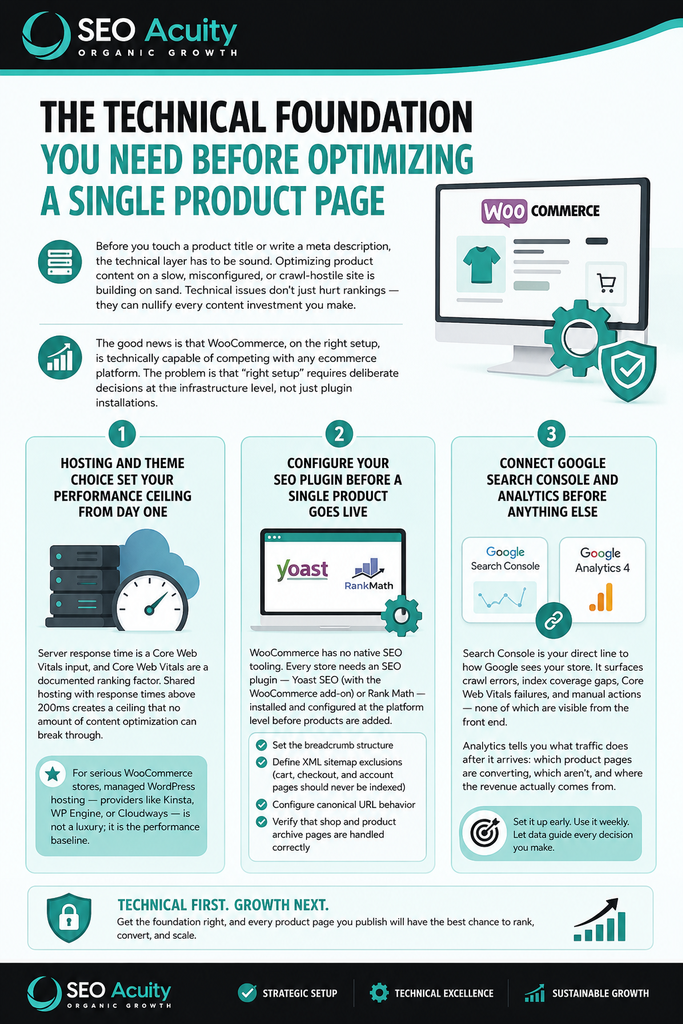
Before you touch a product title or write a meta description, the technical layer has to be sound. Optimizing product content on a slow, misconfigured, or crawl-hostile site is building on sand.
The good news is that WooCommerce, on the right setup, is technically capable of competing with any ecommerce platform. The problem is that “right setup” requires deliberate decisions at the infrastructure level, not just plugin installations.
1. Chose Hosting And Theme To Set Your Performance Ceiling From Day One
Server response time is a Core Web Vitals input, and Core Web Vitals are a documented ranking factor.
Consistently slow server response times can make it harder to meet Core Web Vitals targets and can undermine the user experience, especially on high-traffic WooCommerce stores.
Theme choice compounds the issue. A bloated theme loading 15 scripts and 8 stylesheets on every product page will undermine page speed regardless of caching.
Lightweight, ecommerce-tested themes like Kadence, GeneratePress, or Blocksy give product pages the speed budget to meet Core Web Vitals thresholds without heroic optimization effort later.
2. Configure Your Seo Plugin Before A Single Product Goes Live
WooCommerce has no native SEO tooling. Every store needs an SEO plugin — Yoast SEO (with the WooCommerce add-on) or Rank Math — installed and configured at the platform level before products are added.
This means setting the breadcrumb structure, defining XML sitemap exclusions (cart, checkout, and account pages should never be indexed), configuring canonical URL behavior, and verifying that shop and product archive pages are handled correctly.
Skipping this step creates technical debt that multiplies with catalog size. Fixing canonical issues across 5,000 product pages after the fact is an order of magnitude harder than configuring them correctly at launch.
Understanding why are SEO audits important is partly about this — audits catch exactly these inherited structural problems before they compound into ranking losses.
If your setup has already accumulated inherited issues, an SEO Audit is the fastest way to map the technical debt and prioritize what to fix first.
See what’s included in our SEO Audit Services →
3. Connect Google Search Console And Analytics Before Anything Else
Search Console is your direct line to how Google sees your store. It surfaces crawl errors, index coverage gaps, Core Web Vitals failures, and manual actions — none of which are visible from the front end.
Analytics tells you what traffic does after it arrives: which product pages are converting, which aren’t, and where the revenue actually comes from.
Connecting both before you optimize gives you a baseline. Without it, you are guessing at both the problems and whether your fixes worked. Set up Search Console verification through your SEO plugin, submit your sitemap, and check coverage weekly.
Our Technical SEO Services cover infrastructure audits, Core Web Vitals remediation, and crawlability setup for WooCommerce stores that need to close the technical gap quickly.
WooCommerce Product SEO In Practice
With the technical foundation in place, product-level optimization is where the ranking work happens. The three elements that most consistently determine whether a product page ranks — and whether ranked traffic converts — are the product title, the URL, and the descriptions. Getting these right is not complicated, but getting them wrong at scale is expensive.
The principle is simple: every field the search engine reads should serve the query and the buyer simultaneously. These are not competing goals.
1. Your Product Title Earns Rankings And Click-Through Rate In One Shot
The WooCommerce product title is typically used as the page’s H1, while your SEO plugin controls the title tag shown to search engines.
The product title is the H1 of the product page and typically the SEO title as well. It needs to carry the primary keyword the buyer uses to find this product, and it needs to be compelling enough to earn a click in the search results.
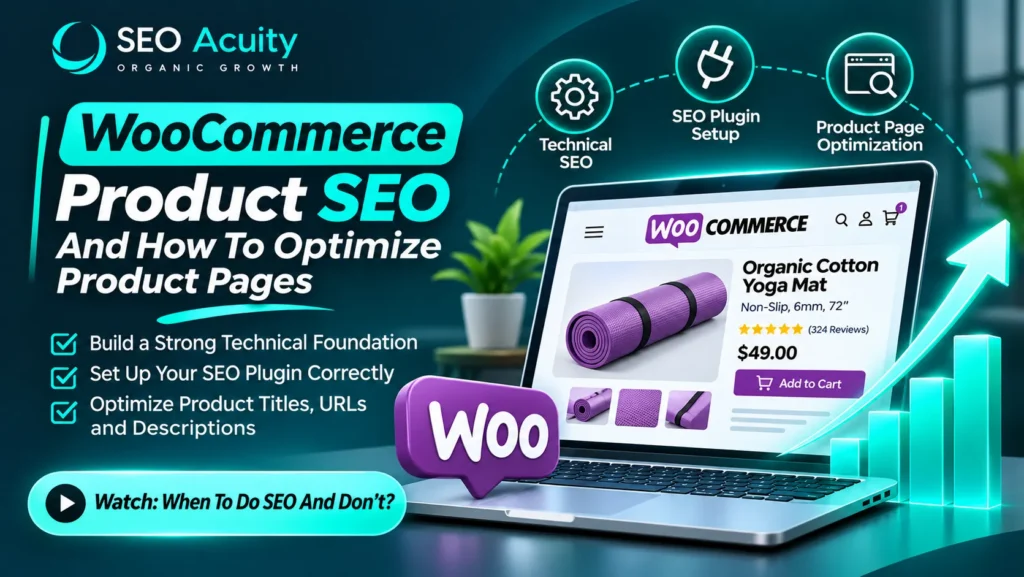
A formula that consistently works: primary keyword variation + product identifier + differentiator. “Organic Cotton Yoga Mat — Non-Slip, 6mm, 72″” performs better than “Yoga Mat” because it matches how buyers search (material, use case, specification) and gives Google enough signal to rank it for specific queries.
One structural note worth remembering: the WooCommerce product title is your H1. Do not duplicate it exactly in the Yoast or Rank Math SEO title field.
Customize the SEO title to include the brand name or a slight variation that fits within the 55–60 character limit for the SERP snippet.
Ready to Improve Your Search Engine Rankings?
Accelerate your organic growth and scale your business leads with our data-driven SEO strategies.
Get a Free Quote NOW!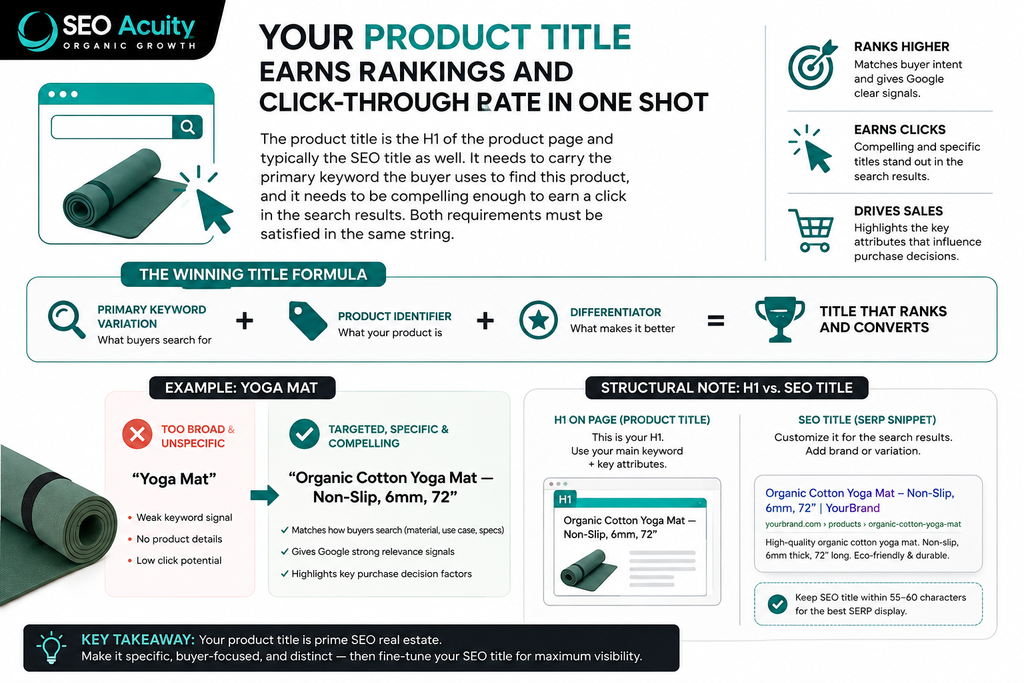
2. Cleaning URLS Are A Signal You Cannot Afford To Leave Messy
By default, WooCommerce adds /product/ to every product URL and /product-category/ to every category URL. These slugs are unnecessary, add character length, and create slightly weaker URL signals. Consistency + clean architecture + avoiding unnecessary URL changes.
More importantly, the product slug itself should be the keyword phrase — lowercase, hyphen-separated, no stop words. /organic-cotton-yoga-mat/ beats /product/yoga-mat-6mm-bestseller-organic-quality/ on every dimension: it is cleaner to read in a SERP, easier for an inbound link to anchor naturally, and sends a cleaner semantic signal.
Change slugs carefully on an established store. Redirects are required on any URL that already has inbound links or indexed traffic. A blanket permalink change without a redirect audit can erase existing rankings overnight.
3. Unique Descriptions Are Non-Negotiable To Rank In Competitive Categories
WooCommerce provides two description fields per product: the short description, shown near the add-to-cart button, and the long description, shown in the product tabs below.
The long description is where you build the topical depth that earns rankings in competitive categories. It should cover the product’s core use case, who it’s designed for, material or ingredient specifics, usage guidance, and answers to the questions buyers commonly ask before purchasing.
Copying manufacturer descriptions across products, or using near-identical text for product variations, is one of the most common and most punishing WooCommerce SEO mistakes.
On-Page SEO Services at SEO Acuity include product-level content auditing, rewriting thin or duplicate descriptions, and building scalable content templates that work across large catalogs.
What the Yoast SEO WooCommerce Setup Does for Your Store
The Yoast SEO WooCommerce add-on extends the standard Yoast functionality with features built specifically for product page optimization.
Where the free Yoast plugin provides basic meta fields, the WooCommerce extension adds structured data controls, product identifier fields, and a content analysis layer tuned to commercial page intent.
Understanding what each feature does — not just where to click — is what separates stores that configure Yoast properly from those that install it and forget it. Before configuring, the add-on needs to be active alongside both WooCommerce and Yoast SEO Free.
1. Keywords Run The Content Analysis Every Product Page Needs
The focus keyphrase field tells Yoast which term to analyze the page against. Set it to the primary keyword a buyer would use to find this specific product — not the brand name, not a generic category term.
Yoast then runs its content analysis across the title, meta description, short description, long description, headings, and slug, flagging where the keyphrase is missing, overused, or poorly distributed.
Yoast’s traffic-light scoring is a guide, not a mandate. A red light on keyphrase density doesn’t mean the page won’t rank — it means Yoast’s algorithm thinks it’s underoptimized relative to its internal benchmark.
Prioritize the signals that matter for real search behavior: keyphrase in the title, in the first paragraph of the long description, and in at least one subheading.
Premium accounts can add related keyphrases, allowing the same page to be optimized for semantic variations — “yoga mat” and “exercise mat” can sit together without creating separate pages that compete against each other.
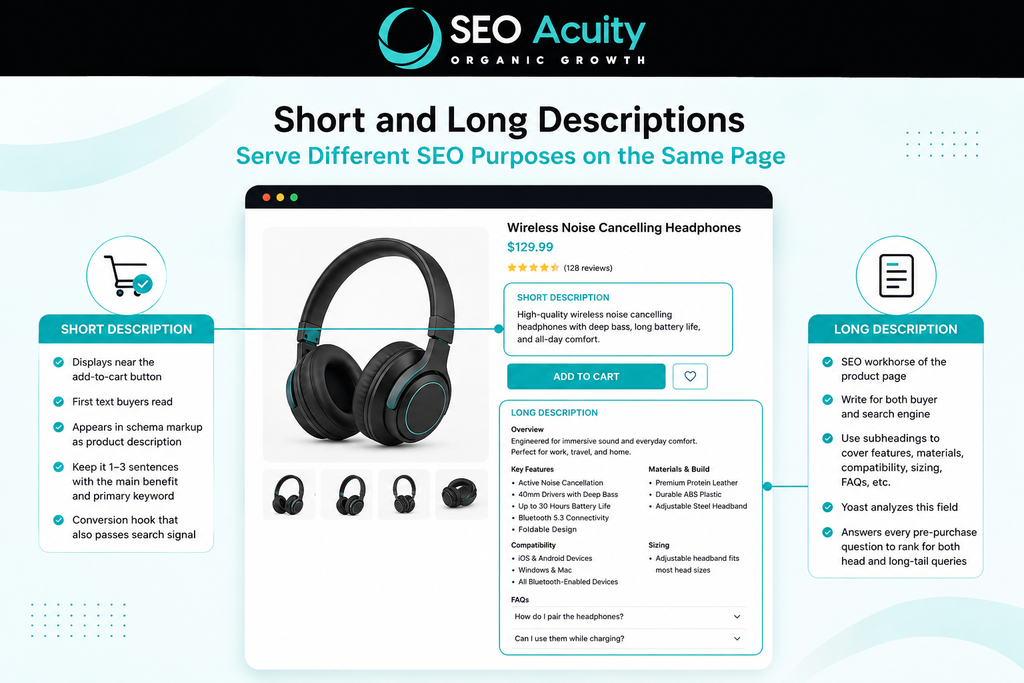
2. Short And Long Descriptions Serve Different SEO Purposes On The Same Page
The short description renders near the add-to-cart button — it’s the first text a buyer reads on the product page. From an SEO standpoint, it also tends to appear in schema markup as the product description field.
Keep it to 1–3 sentences covering the most important product benefit and the primary keyword. It is not a tag cloud; it is a conversion hook that simultaneously passes search signals.
The long description is the SEO workhorse. This is where you write for both the buyer and the search engine: structured with subheadings if the product has enough complexity to warrant them, covering features, materials, compatibility, sizing, and common pre-purchase questions.
Yoast’s content analysis runs against this field, but the real goal is building a page that answers every relevant pre-purchase question — because stores that do this comprehensively tend to rank for both head and long-tail queries in the same category.
3. Product Identifiers Let Schema Tell Google Exactly What Each Product Is
The Yoast WooCommerce SEO add-on adds a product identifier section to the edit screen: GTIN8, GTIN12, GTIN13, GTIN14, ISBN, and MPN fields. These identifiers feed directly into the product schema markup Yoast generates.
When present, they allow Google to match your product to its Merchant Center records, enable Product Knowledge Panels, and improve eligibility for rich results, price, availability, and review snippets appearing inline in the SERP.
For stores that haven’t populated these fields, the fix is straightforward: export the product catalog, fill in GTINs and MPNs from manufacturer data or barcode records, and import.
The ranking uplift from completed schema — especially for branded product queries — is measurable and typically materializes within a few crawl cycles.
Discover: How let your store appear in Google and AI Search results
Ready to Improve Your Search Engine Rankings?
Accelerate your organic growth and scale your business leads with our data-driven SEO strategies.
Get a Free Quote NOW!Optimize Product Images And Core Web Vitals
Product images are simultaneously the primary conversion asset on a product page and a significant ranking variable. Most WooCommerce stores underoptimize images because the problem isn’t visible until it shows up in Core Web Vitals data — by which point rankings have already been suppressed.
The baseline requirements: serve product images in WebP format (WooCommerce supports this natively in WordPress 5.8+ with browser fallback), compress to the smallest size that maintains visual quality, and use descriptive file names before upload. blue-ceramic-coffee-mug-12oz.webp tells Google what the image shows without relying solely on alt text.
Alt text is not optional and is not a keyword field. It is a description of what the image shows, written as you would describe it to someone who cannot see it. “Ceramic coffee mug” is appropriate; “buy blue coffee mug online WooCommerce shop” is keyword stuffing and damages rather than helps rankings.
Core Web Vitals for WooCommerce product pages require their own dedicated attention. Largest Contentful Paint (LCP) is typically driven by the product hero image — preloading it via <link rel=”preload”> in the theme or through a performance plugin can meaningfully reduce LCP on product pages.
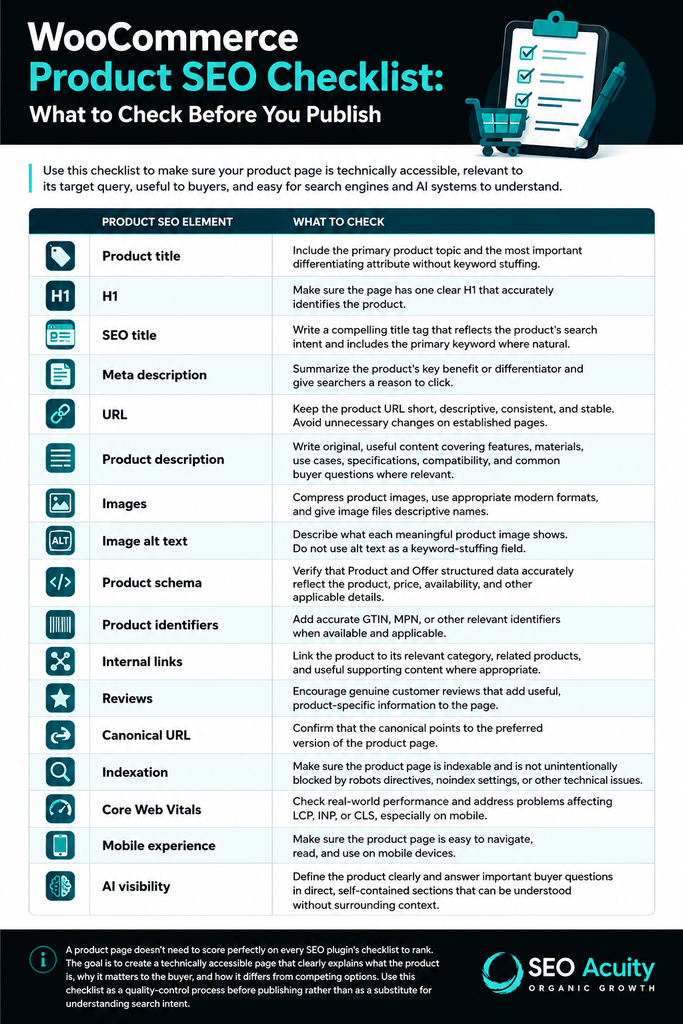
WooCommerce Product SEO Checklist: What to Check Before You Publish
Before publishing or updating a WooCommerce product page, run through this checklist to make sure the page is technically accessible, relevant to its target query, useful to buyers, and easy for search engines and AI systems to understand.
| Product SEO Element | What to Check |
| Product title | Include the primary product topic and the most important differentiating attribute without keyword stuffing. |
| H1 | Make sure the page has one clear H1 that accurately identifies the product. |
| SEO title | Write a compelling title tag that reflects the product’s search intent and includes the primary keyword where natural. |
| Meta description | Summarize the product’s key benefit or differentiator and give searchers a reason to click. |
| URL | Keep the product URL short, descriptive, consistent, and stable. Avoid unnecessary changes on established pages. |
| Product description | Write original, useful content covering features, materials, use cases, specifications, compatibility, and common buyer questions where relevant. |
| Images | Compress product images, use appropriate modern formats, and give image files descriptive names. |
| Image alt text | Describe what each meaningful product image shows. Do not use alt text as a keyword-stuffing field. |
| Product schema | Verify that Product and Offer structured data accurately reflect the product, price, availability, and other applicable details. |
| Product identifiers | Add accurate GTIN, MPN, or other relevant identifiers when available and applicable. |
| Internal links | Link the product to its relevant category, related products, and useful supporting content where appropriate. |
| Reviews | Encourage genuine customer reviews that add useful, product-specific information to the page. |
| Canonical URL | Confirm that the canonical points to the preferred version of the product page. |
| Indexation | Make sure the product page is indexable and is not unintentionally blocked by robots directives, noindex settings, or other technical issues. |
| Core Web Vitals | Check real-world performance and address problems affecting LCP, INP, or CLS, especially on mobile. |
| Mobile experience | Make sure the product page is easy to navigate, read, and use on mobile devices. |
| AI visibility | Define the product clearly and answer important buyer questions in direct, self-contained sections that can be understood without surrounding context. |
A product page does not need to score perfectly on every SEO plugin’s checklist to rank. The goal is to create a technically accessible page that clearly explains what the product is, why it matters to the buyer, and how it differs from competing options.
Use this checklist as a quality-control process before publishing rather than as a substitute for understanding search intent.
Build Internal Links and Prevent Duplicate URLs
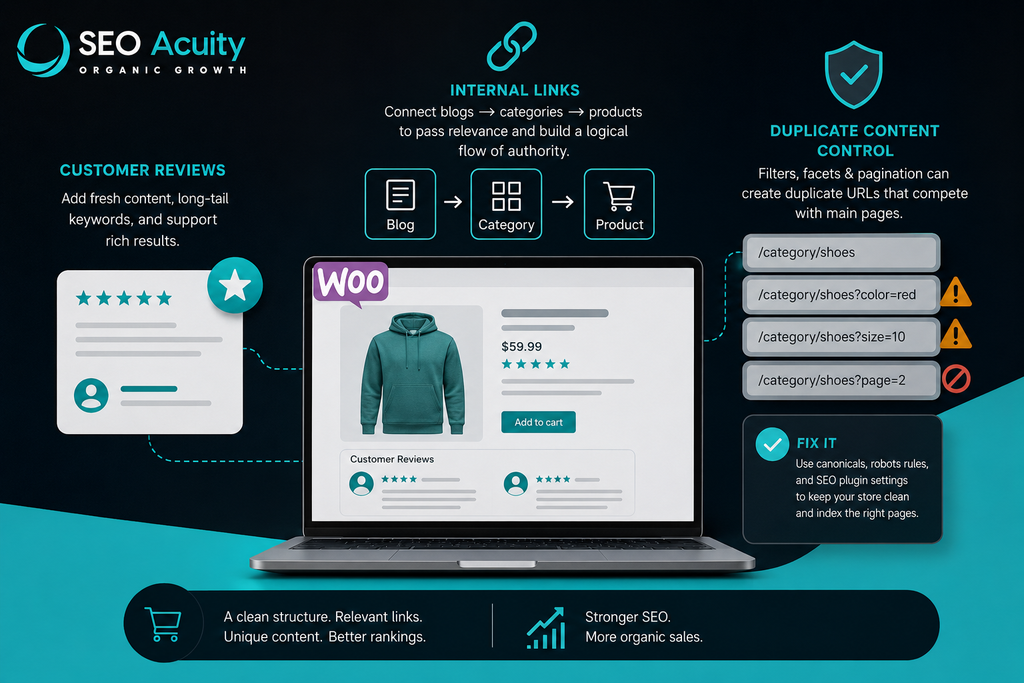
Customer reviews support WooCommerce SEO in several ways: they add fresh, unique content to product pages, naturally introduce long-tail keywords through customer language, and can contribute to review schema and eligible rich results.
Linking relevant blog content to product and category pages helps pass topical relevance and creates a clear path from informational content to commercial pages.
A strong internal linking structure can connect cornerstone content to category pages and then to individual products, creating a logical flow of authority throughout the store.
For businesses still deciding which platform best supports this type of architecture, best ecommerce platforms for SEO provides a detailed comparison of the leading options.
WooCommerce can also create duplicate or near-duplicate URLs through faceted navigation, filters, and pagination. Filtering products by color, size, or price can generate numerous URLs that compete with the main category pages, while paginated pages need appropriate canonical handling.
When Does WooCommerce SEO Consulting Make Sense?
WooCommerce SEO consulting goes beyond a one-time audit or plugin recommendations. It involves identifying technical, content, catalog, and authority gaps, creating a prioritized SEO roadmap, and either implementing the strategy or guiding the client’s team through execution.
Whether organic traffic has plateaued, conversions are low, or the store is new, the process usually begins with understanding what is an SEO audit.
A comprehensive engagement typically covers technical infrastructure, Core Web Vitals, crawlability, schema, product and category optimization, internal linking, catalog strategy, and backlinks.
The types of SEO audits needed can vary by area, so each layer should be assessed according to the store’s specific needs rather than through a generic checklist.
Pricing also varies by scope, with one-time audits and monthly consulting retainers depending on catalog size, technical complexity, and whether content or implementation is included. Choosing between a freelancer and an SEO agency depends largely on the store’s size, goals, and growth rate.
Freelancers can be effective for focused projects, while ecommerce-focused agencies may be better equipped for large catalogs and complex ongoing campaigns.
Ready to Improve Your Search Engine Rankings?
Accelerate your organic growth and scale your business leads with our data-driven SEO strategies.
Get a Free Quote NOW!How AI Search Changes WooCommerce Product SEO?
Google still drives the majority of search-driven ecommerce traffic. But the way search works at the AI layer is changing the criteria for what earns organic visibility.
ChatGPT, Gemini, Perplexity, and Google’s AI Overviews don’t rank pages — they retrieve chunks of content and cite sources that answered the query most directly.
For WooCommerce stores, product page content now has to meet two standards simultaneously: traditional ranking criteria and AI retrievability. These two standards are more complementary than they are in conflict, but they require slightly different thinking.
A page optimized for AI retrieval will typically also rank well because the same qualities that make content extractable also satisfy E-E-A-T signals that Google rewards.
1. Write Product Content As Standalone Retrieved Chunks
AI-powered search systems may retrieve and use individual passages or chunks of content. A paragraph that only makes sense in the context of the section above it gets extracted without context and typically fails the relevance threshold.
The fix is to write every paragraph as if it could stand alone. Each paragraph should carry its topic, its key entity (the product), and its answer to an implied question.
“This mat is made from natural rubber, providing 4.5mm of joint cushioning during practice and resisting slip on hardwood floors” is a standalone fact.
Is google dead is a question more WooCommerce store owners ask as AI-driven traffic grows. The honest answer is: Google remains dominant for product discovery, but AI-driven queries are growing fast, and stores that write for retrieval win on both channels simultaneously.
Does SEO still matter if AI search keeps growing is another question with a clear answer: yes, because AI systems source their answers from indexed, crawlable, well-structured content.
Watch: How Does AI Search Work?
2. Entity Clarity Makes Product Pages Citable Across Both Search Systems
Entity clarity means defining exactly what a product is, who it is for, and what makes it different in a clear sentence near the top of the page. AI systems rely on clear, consistent descriptions to identify and retrieve information.
The benefits of AI SEO for businesses are closely connected to this clarity. The difference between AI SEO vs traditional SEO is that traditional SEO focuses heavily on ranking signals, while AI SEO also considers how easily information can be understood and retrieved.
Do AI and GEO / AEO replace SEO is an important strategic question, but GEO and AEO do not replace SEO. They build on a strong technical foundation by making content easier for AI systems to understand and retrieve.
Large language model optimization (LLMO) applies these principles directly to ecommerce through structured product descriptions, direct answers, and clearly defined entities.
Explore: How To Rank In AI Search (ChatGPT, Gemini .. etc)
Ready to Improve Your Search Engine Rankings?
Accelerate your organic growth and scale your business leads with our data-driven SEO strategies.
Get a Free Quote NOW!SEO Acuity: Organic Growth Architecture for WooCommerce Stores
SEO Acuity is not a plugin shop or a content production service. We are an Organic Growth Architecture firm that builds search systems — technical, content, and AI-retrieval layers — that compound into defensible market positions.
Our Organic Growth Foundation™ is the starting point for stores that need to build the right technical and content architecture before scaling.
For stores expanding into the GCC and MENA region, GCC Market Expansion SEO™ is built specifically for Arabic-language market growth — a channel most international WooCommerce stores leave entirely uncontested.
Stores that serve Arabic-speaking audiences in their native language benefit from Arabic SEO Services that bring the same strategic rigor to Arabic-language product optimization, from keyword architecture through schema and AI retrievability.
Talk to SEO Acuity about an Organic Growth Foundation™ assessment.

Conclusion
WooCommerce product SEO is one of the few growth channels where the work genuinely compounds. A well-optimized product page doesn’t just rank — it earns links, generates reviews, becomes a citable entity in AI search, and builds category authority that makes every subsequent product easier to rank.
The challenge is that the system requires commitment to build correctly. Technical infrastructure, structured data, unique content at scale, AI-retrievable paragraphs — none of these are afternoon projects.
But for stores willing to structure their catalog for organic growth, the compound return over 12 to 24 months is typically the highest-ROI channel in their growth stack.
The stores that win the search are not the ones with the best products. They are the ones with the best-optimized product pages, the clearest entity signals, and the structural authority that search engines and AI systems trust enough to cite.
Frequently Asked Questions
What is the most important on-page element for WooCommerce product SEO?
The product title is the single most important on-page element. It functions as the H1, informs the SEO title, and is the first signal Google and AI systems use to understand what the product is.
A title that carries the primary keyword and specific product attributes, material, size, use case, consistently outperforms generic titles in both rankings and click-through rate.
Do I need a paid SEO plugin for WooCommerce, or does the free version cover the basics?
For basic needs (meta titles, descriptions, sitemaps, and basic schema), the free versions of Yoast SEO or Rank Math are enough. The paid Yoast WooCommerce add-on earns its cost for stores that need GTIN and MPN fields in schema, advanced breadcrumb control, and social image overlays, which is why large, complex catalogs benefit most.
How does WooCommerce handle duplicate content across product variations?
WooCommerce doesn’t create separate URLs for variations; they load via JavaScript on the parent product page, so duplicate content isn’t usually a URL-level issue. The subtler risk is thin or identical descriptions, which leaves the page weak for variation-specific searches. Fix it by adding variation-relevant details to the long description or using product tabs.
How long does it take to see results from WooCommerce SEO improvements?
Technical improvements often surface in Search Console within two to four weeks as Google re-crawls the affected pages. Content improvements on product pages typically show ranking movement within four to twelve weeks, depending on the page’s prior history and the competitiveness of the keyword.
Category-level authority and AI retrievability improvements operate on a longer timeline, usually three to six months of consistent work before compounding becomes visible.
What is the difference between WooCommerce SEO and Shopify SEO?
WooCommerce gives more granular control over technical SEO — URL structure, schema customization, hosting choice, plugin flexibility — but that control requires active management. Shopify abstracts most of the technical layer, which reduces configuration burden but also limits customization options.
When does it make sense to hire a WooCommerce SEO consultant rather than managing SEO in-house?
Bring in a consultant when your catalog has outgrown consistent internal management, organic traffic has plateaued despite content investment, or you’re entering a competitive category where technical precision matters. Against competitors with mature organic programs, specialist expertise usually pays for itself faster than internal trial and error.